Stake Privately
ZK-NPoS is Orbinum's private staking: zero-knowledge membership on Nominated Proof-of-Stake. A pool whose root opened it to private members can be joined from your Private Vault: you stake an ORB note and receive the pool's shares as a private note. Rewards raise the value of every share; when you leave, the shares turn back into an ORB note. No account signs anything, so nobody can tell it was you. How it works in the runtime is in ZK-NPoS: Private Staking.
What stays public
| Public | Hidden |
|---|---|
| The pool, the amount and when | Who entered or left |
| The pool's total private stake and shares — on its page, under Stake and as the Private stake tile's Pool total | Every member's balance and history |
Each entry and exit is a bound spend (shieldedPool.boundSpend): a spend of one
note whose zero-knowledge proof also commits to the staking action. It is built on your
device and sent without a signature, so no account is linked to it. The pool's other
members, its operators and the validators it backs see the same as anyone else.
What you need
- An unlocked Private Vault.
- One ORB note worth at least the amount plus the network fee. The minimum entry is 10 ORB; the fee is the minimum spend fee, 0.001 ORB. A bound spend takes a single note: if your ORB is split across notes, combine them first with a private transfer to yourself. With no private ORB at all, shield some first.
- A pool open to private members. In Staking → Pools → Browse pools they carry a Private badge.
- Any account can do it: a validator, a nominator, or a member of this or any other pool, its roles included. No account enters the pool, so the one-role-per-account rule does not apply. Bonded ORB cannot be used as it is: unbond it (2 eras), then shield it.

Join privately
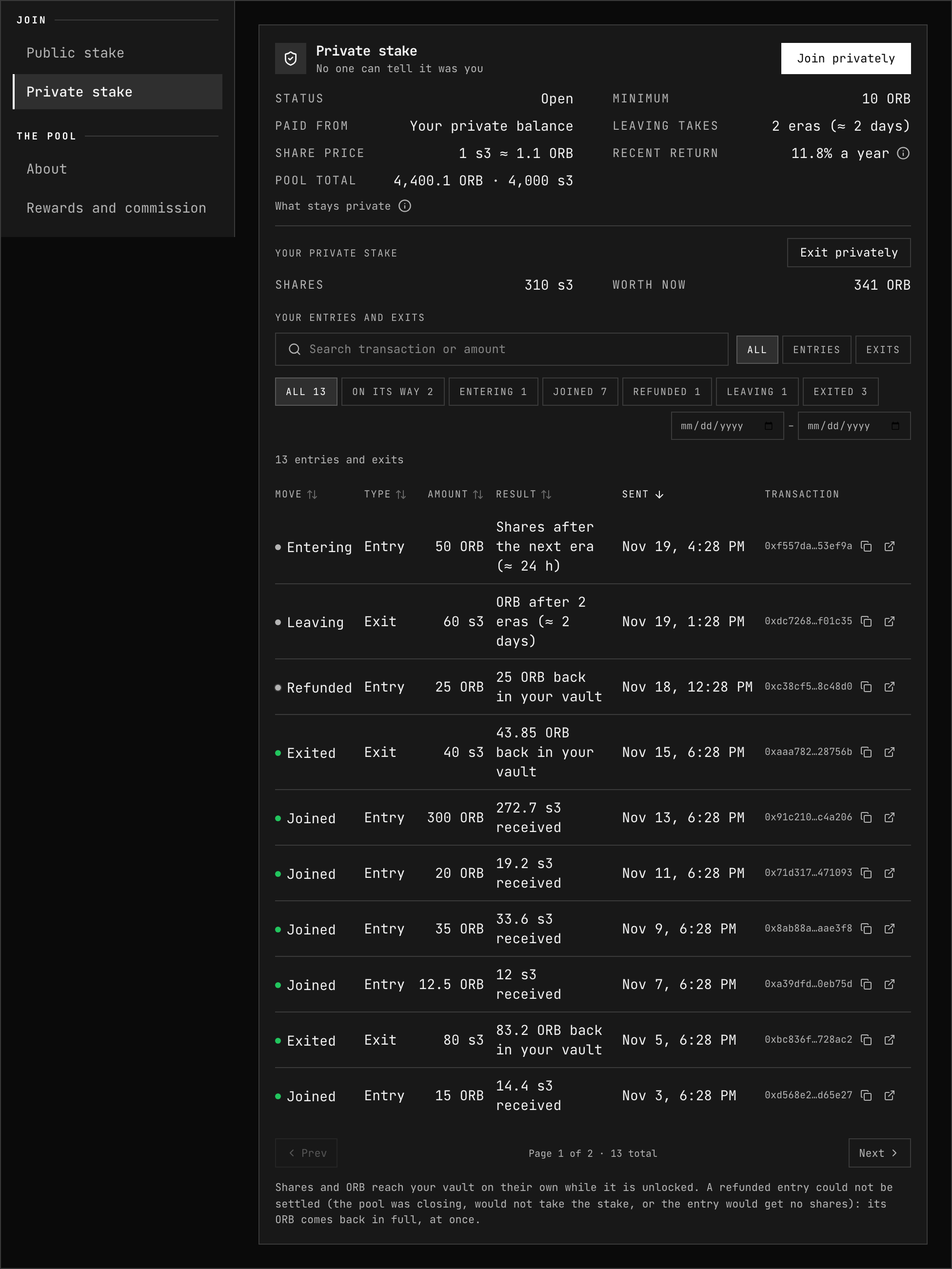
- Open the pool and, on Overview, choose Private stake under Join. It shows the pool's status for private members, the minimum, the share price and how long leaving takes.
- Press Join privately and enter the amount. Max fills in the most one note can stake after the fee.
- Read the summary:
- From your private balance — Stake, Network fee, and Change back to you (what is left of the note returns as a new note).
- You receive — Estimated shares at today's price and the Share price.
- Press Join privately. The app first checks the pool with the chain (Checking…), so an entry that would be refused stops here rather than after a proof.
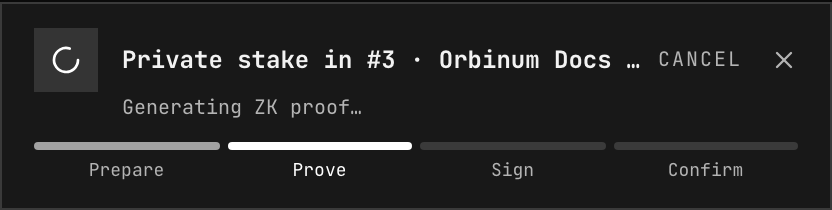
- The dialog closes and the proof is built in the background: the progress bar follows you around the app (Prepare, Prove, then Submitting… and Confirm). You can cancel while it prepares or proves. One shielded operation runs at a time. See Running an operation.
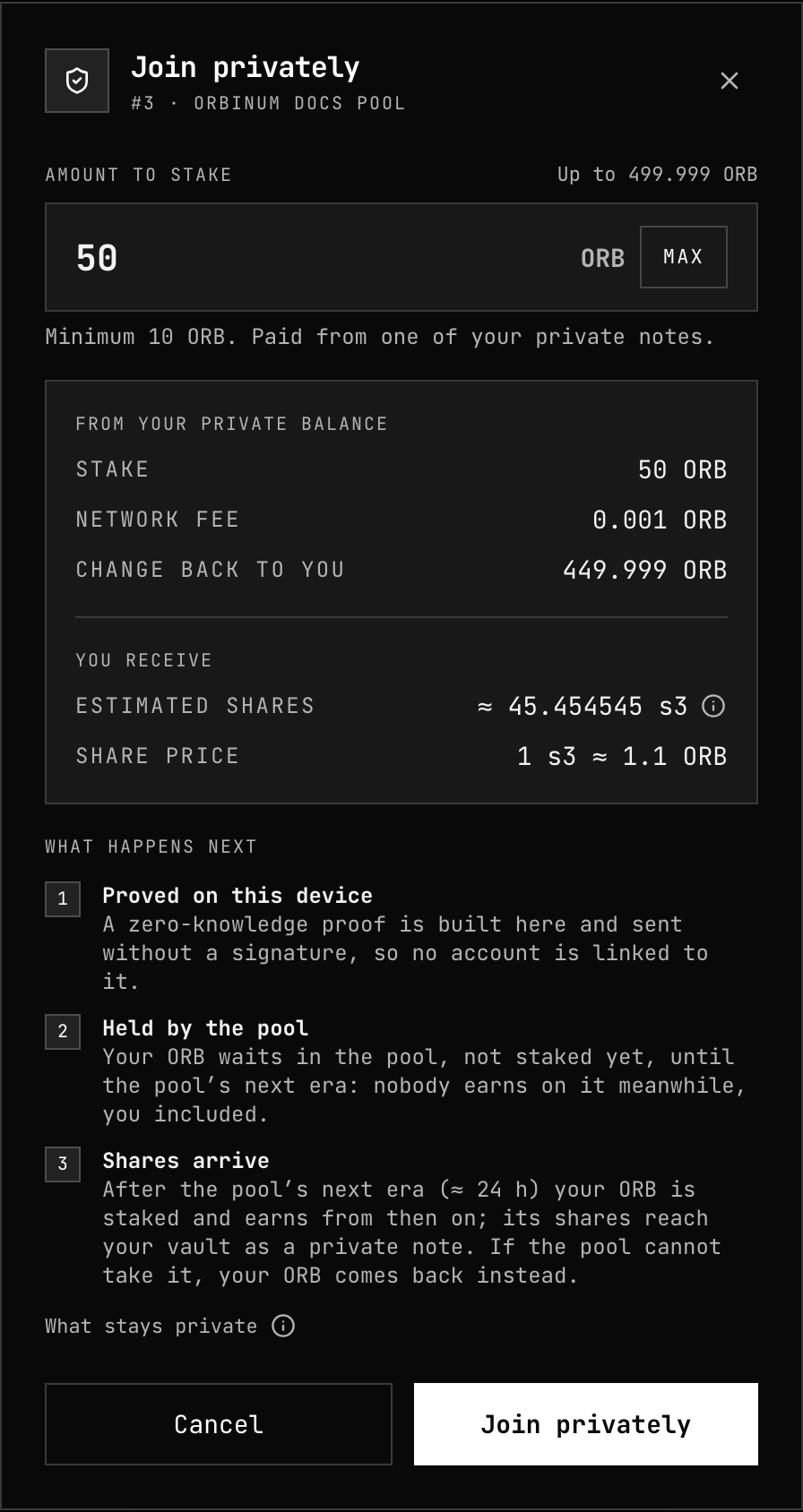
The dialog lists what happens next:
| Step | What happens |
|---|---|
| 1. Proved on this device | The proof is built in your browser and sent without a signature |
| 2. Held by the pool | Your ORB waits in the pool, not staked yet, until the pool's next era: nobody earns on it meanwhile, you included |
| 3. Shares arrive | After the pool's next era your ORB is staked and earns from then on; its shares reach your vault as a private note |
How many shares you get
Your entry is priced when it settles, after the era it came in has been compounded. Rewards compounded meanwhile raise the share price, so you may get fewer shares than estimated, each worth more: their value is still what you staked. Waiting ORB is not staked, so it neither earns nor takes anything from the pool's members, and a slash in the meantime does not touch it.
Refunds
An entry that cannot be settled is refunded at once: your ORB comes back to your vault in full, as a Stake refund note, in the same block. It happens when:
- the pool is being destroyed;
- the pool will not take the stake (it was blocked, or its join minimum changed);
- the entry would get no shares at all.
The app never asks for a minimum number of shares beyond one: a rising share price lowers the count, not the value, so it is no reason to refund.
Entries are queued per pool and era: up to 8,192 per pool each era. A full queue refuses new entries until the next era.
Shares and their price
Each private pool has its own share asset, "Private stake in pool #N" with the
symbol sN and 18 decimals, like ORB. A share's price is:
(value of the private stake + 1 ORB) / (shares issued + 1 ORB)
The extra 1 ORB on both sides keeps anyone from inflating the price of the first shares; rounding always favours the pool, never the member entering or leaving. Apart from rounding, the price rises with rewards and falls only with a slash.
Rewards compound into the price every era, once automatic payment has paid the pool: the chain bonds the private members' rewards back into the pool, after the pool's commission. There is nothing to claim. While automatic payment is paused, pools neither compound nor settle entries.
Recent return
Recent return is how much the share price grew over the pool's last eras (up to 30), as a yearly rate (APR, not compounded). The chain announces the price after every era, so the figure appears once a pool has two eras of prices. It is a past result, not a promise: like every staking return it falls as more ORB is staked (see How it is split), so on a test network, with little stake, it is far higher than it will be on mainnet.
Your private stake
With the vault unlocked, the pool's Private stake item shows Your private stake: your Shares in this pool, what they are Worth now, and Your entries and exits in this pool (see Your entries and exits). Above them, the pool's terms and its Recent return.
Shares from an entry reach your vault on their own after the pool's next era, while the vault is unlocked: the app reads the block that minted them, with no scan. An exit's or a refund's ORB arrives the same way.
Every pool at once: Your stake
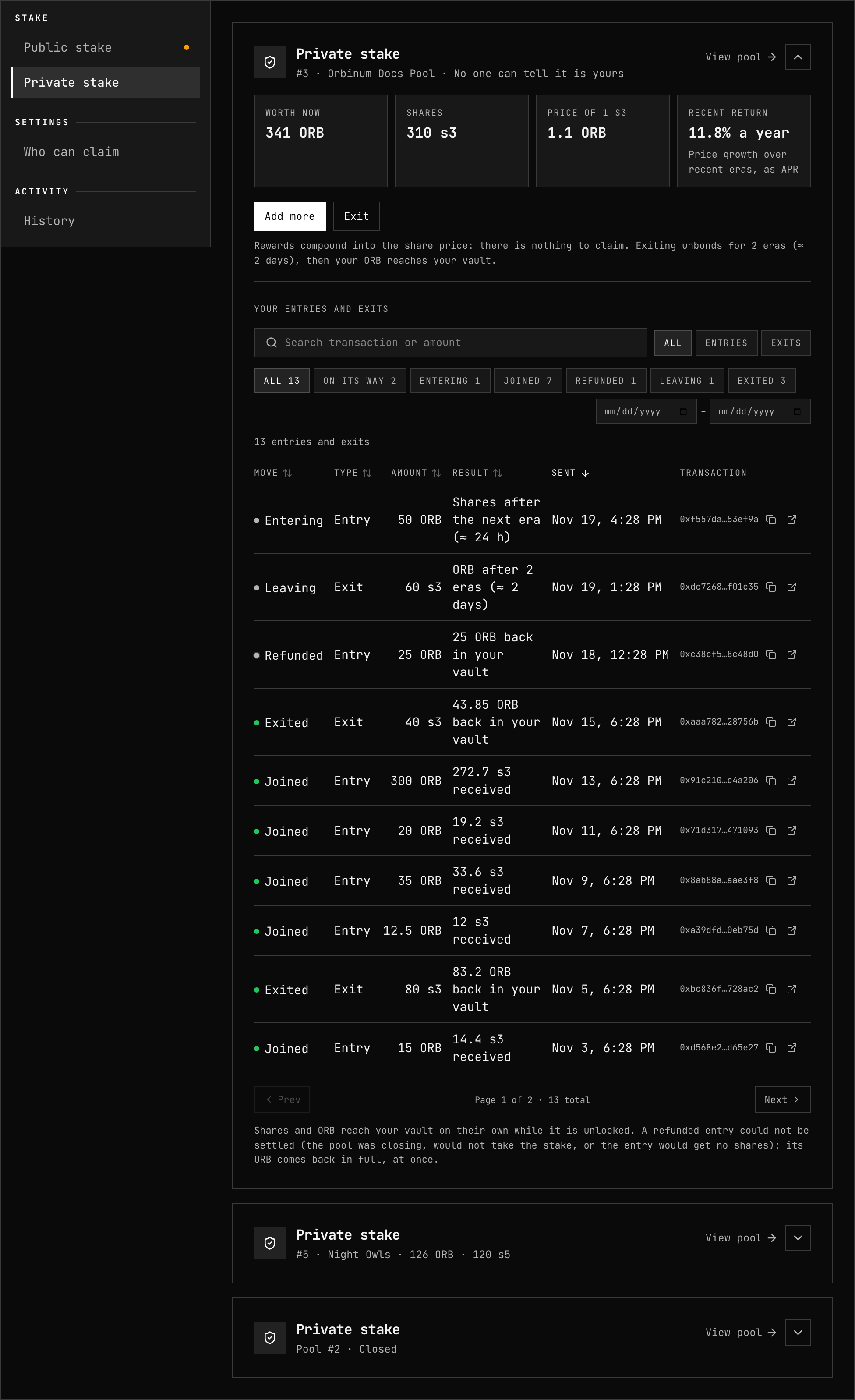
Staking → Pools → Your stake → Private stake shows your private stake in every pool, one card per pool, laid out like the public stake.
Each card folds to its title, what it is worth and your shares, with the arrow on its right. A single pool opens unfolded; among several, only those with an entry or exit on its way do.
- Four figures: Worth now, your Shares, the Price of 1 sN and the pool's Recent return.
- Add more joins the same pool again from your private balance, and Exit leaves it — the same dialogs as on the pool's page, with no need to open it. When more cannot be added, the card says why: the pool is closed to new private entries or closing, the vault is locked, or another shielded operation is running.
- Your entries and exits lists every entry and exit you made in the pool.
- A pool that has closed for good stays listed, marked Closed, with your history in it and no buttons.
Your entries and exits
| Status | Result |
|---|---|
| Entering | Waiting for the pool's next era; shares follow |
| Joined | The shares you received |
| Refunded | The ORB back in your vault (an entry the pool could not settle) |
| Leaving | An exit unbonding; ORB after the unbonding (2 eras) |
| Exited | The ORB back in your vault |
Each row shows the status, whether it was an entry or an exit, the amount, its result, when it was sent and its transaction. The table shows ten rows a page, newest first, and helps you find one among many:
- Search by transaction hash (with or without
0x) or by amount. - Type: all, Entries or Exits.
- Move: every status, with how many of each, and On its way for those still pending.
- Dates: from and to.
- Sort by any column but the transaction: press its heading, again to reverse it.
Clear filters shows them all again.
There is no Claim: rewards compound into the share price. A public membership is one pool per account, but private stake is not tied to an account, so you can hold shares in several pools — your own pool included — and each gets its card.
With the vault locked, Private stake asks you to unlock it.
Your shares are notes in your vault. Like any note, they are found again with Recover Notes if the vault's local data is lost.
The Shielded Pool page shows your private stake beside your private balance — what it is worth, in how many pools, and what is on its way — with a link here: share notes are not ORB, so the balance and the notes list leave them out.
Exit privately
- In the pool's Private stake tile, press Exit privately — or press Exit on the pool's card in Your stake → Private stake.
- Enter the shares to redeem. Max fills in the most one share note can redeem after the fee; shares split across notes leave in separate exits.
- Read the figures: Worth now, the Network fee — paid in shares, worth at least the minimum spend fee — and You accept at least, 1 % below the current worth.
- Press Exit privately. The app checks the exit with the chain, then builds the proof in the background, as for an entry.
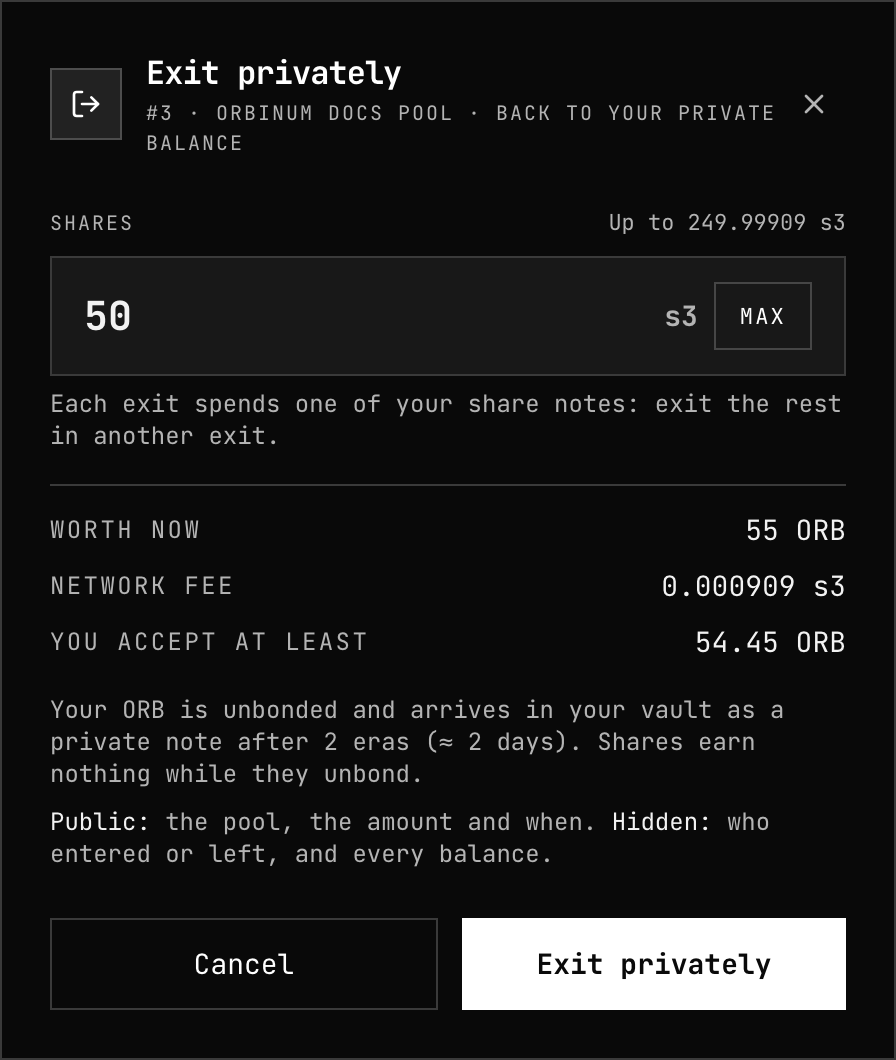
The shares are burned and their value unbonds from the pool; the exit shows as Leaving. After 2 eras (about 2 days) your ORB arrives in your vault as a Stake payout note and the exit shows as Exited. Shares earn nothing while they unbond. If the shares are worth less than You accept at least when the exit lands, the chain refuses it and nothing is spent.
The exit's fee in shares goes to the validator that authored the block: the chain redeems it for ORB, which reaches the validator after the same unbonding.
Why an entry or exit can be refused
The app checks before building a proof and shows the reason:
| Message | What to do |
|---|---|
| This pool takes no private members now. | The root closed it to new private entries |
| This pool takes no new members now. | The pool is blocked or destroying |
| Too small: this pool takes private entries of at least N. | Raise the amount to the minimum |
| This pool no longer exists. | — |
| This pool lost too much to slashes to take new members. | Choose another pool |
| This pool has no room for new members. | The pool is full; choose another |
| This pool has taken all the private entries it can this era. Try again next era. | Wait for the next era |
| These shares cannot be redeemed now. Scan your vault and try again. | Sync the vault and retry |
| That would leave the pool's private stake below its minimum. Leave with everything, or less. | Exit all your shares, or fewer |
| Too many exits are unbonding from this pool. Try again next era. | Wait for the next era |
| The shares are worth less than this exit asks for now. Review the amount and try again. | Open the dialog again for a fresh quote |
When a pool closes or is destroyed
- Closed to new entries. The root can close the pool to private members at any time. It stops new private entries only: private members keep their stake, keep earning, and can exit whenever they want. The tile shows Closed to new entries.
- Destroyed. When a pool is being destroyed, its private side winds down on its own. Entries still waiting for shares are refunded at once, in full. The shares left are fixed at what the private stake is worth and earn nothing more; the tile shows Closing and the fixed total. Exit to get your part back: your ORB arrives once the pool's own unbonding ends.
No role can unbond or remove the private members' stake: only the chain moves it, entry by entry and exit by exit.
Risks
- Commission: the pool's commission comes off private members' rewards as off everyone's, and can rise within the pool's maximum and change rate.
- The pool's choices: a pool that stops nominating earns nothing; one that is destroyed winds down as above.
- Slashing: private members are not slashed while nominator slashing is off, as it is now. If governance turns it back on, a slash lowers the share price, and an exit that is unbonding pays less if the slash reaches it. An entry still waiting for its shares is not staked, so a slash does not touch it. See Slashing.
- Privacy: the amount and time of each entry and exit are public. An unusual amount, an exit right after a matching entry, or shielding an amount and entering with it soon after, can be linked by anyone watching.
- Your notes: your shares are notes in your vault. Keep access to the wallet that unlocks it.
Related
- Join a pool — the public stake
- Run a pool — opening a pool to private members
- Private Vault — unlocking, notes and operations
- Rewards — how era rewards are split
- Parameters — minimums and periods